
Windows Forensics
lien du cours : https://tryhackme.com/r/room/windowsforensics1
Regedit
appuyez simultanément sur les touches Windows et R.
Une fenêtre d'exécution s'ouvre alors, qui ressemble à ceci :
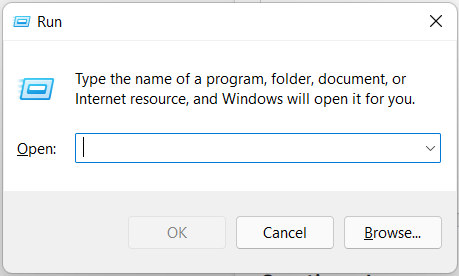
regedit.exeStructure du registre :
Le registre d'un système Windows contient les cinq clés racine suivantes :
- HKEY_CURRENT_USER
- HKEY_USERS
- HKEY_LOCAL_MACHINE
- HKEY_CLASSES_ROOT
- HKEY_CURRENT_CONFIG
If you are accessing a live system, you will be able to access the registry using regedit.exe, and you will be greeted with all of the standard root keys we learned about in the previous task. However, if you only have access to a disk image, you must know where the registry hives are located on the disk. The majority of these hives are located in the C:\Windows\System32\Config directory and are:
- DEFAULT (mounted on
HKEY_USERS\DEFAULT) - SAM (mounted on
HKEY_LOCAL_MACHINE\SAM) - SECURITY (mounted on
HKEY_LOCAL_MACHINE\Security) - SOFTWARE (mounted on
HKEY_LOCAL_MACHINE\Software) - SYSTEM (mounted on
HKEY_LOCAL_MACHINE\System)
Hives containing user information:
Apart from these hives, two other hives containing user information can be found in the User profile directory. For Windows 7 and above, a user’s profile directory is located in C:\Users\<username>\ where the hives are:
- NTUSER.DAT (mounted on HKEY_CURRENT_USER when a user logs in)
- USRCLASS.DAT (mounted on HKEY_CURRENT_USER\Software\CLASSES)
The USRCLASS.DAT hive is located in the directory C:\Users\<username>\AppData\Local\Microsoft\Windows
The NTUSER.DAT hive is located in the directory C:\Users\<username>\
No comments to display
No comments to display