
Custom BlackView BV4800
Lets modify file in ROM
Installa Magiskboot
https://aur.archlinux.org/packages/magiskboot-bin
yay -S magiskboot-binChange picture on boot
download file from rom like boot.bin , vbmeta.bin , super.bin
use command to unpack file
magiskboot unpack magisk_patched-26100_biB8t.imguse command to repack file
magiskboot repack magisk_patched-26100_biB8t.imgComposition ROM BV4800
├── boot_a.bin
├── boot_b.bin
├── boot_para.bin
├── dtbo_a.bin
├── dtbo_b.bin
├── expdb.bin
├── flashinfo.bin
├── frp.bin
├── gpt_backup.bin
├── gpt.bin
├── gz_a.bin
├── gz_b.bin
├── init_boot_a.bin
├── init_boot_b.bin
├── lk_a.bin
├── lk_b.bin
├── logo.bin
├── md1img_a.bin
├── md1img_b.bin
├── md_udc.bin
├── metadata.bin
├── nvcfg.bin
├── nvdata.bin
├── nvram.bin
├── otp.bin
├── para.bin
├── persist.bin
├── proinfo.bin
├── protect1.bin
├── protect2.bin
├── scp_a.bin
├── scp_b.bin
├── sec1.bin
├── seccfg.bin
├── spmfw_a.bin
├── spmfw_b.bin
├── sspm_a.bin
├── sspm_b.bin
├── super.bin
├── tee_a.bin
├── tee_b.bin
├── vbmeta_a.bin
├── vbmeta_b.bin
├── vbmeta_system_a.bin
├── vbmeta_system_b.bin
├── vbmeta_vendor_a.bin
├── vbmeta_vendor_b.bin
├── vendor_boot_a.bin
└── vendor_boot_b.bin
++ user_data.bin
Fichier du firmware --> super.bin
Fichier gestion des erreur green / yellow / orange /red --> lk_a.bin
Modification firmware --> super.bin
la modification et le flash de de ce fichier ne reset pas le tel
on peut modifier le fichier avec nan oet le flash direct sans crash
Modification Erreur state --> lk_a.bin
Si on modifier le fichier cela empêche le téléphone de boot correctement
il faut donc le modifier avec délicatesse
Si on suit a la lettre ce poste suivieon
cele postemodifier tuto complet :
https://www.hovatek.com/forum/thread-31664.html
Retirer Orange State :
hexedit lk_a.binUtiliser la touche "tab" pour passer du coté ASCII faire une recherche avec la touche "/" et recherche le mot "Orange" puis entré pour confimé.
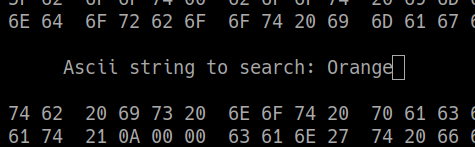
Supprimé la notification de l'erreur Orange State en remplacent l'hexa du text par des 0

comme ceci.

Enregistré avec CTR+X et yes
Flash avec MTKclient le nouveau fichié lk_a.bin
python mtk w lk_a lk_a.bin reboot le tel
python mtk reset