# Custom Rom

# Custom BlackView BV4800

### Lets modify file in ROM

### Installa Magiskboot

[https://aur.archlinux.org/packages/magiskboot-bin](https://aur.archlinux.org/packages/magiskboot-bin)

```bash
yay -S magiskboot-bin
```

### Change picture on boot

download file from rom like boot.bin , vbmeta.bin , super.bin

##### use command to unpack file 

```bash
magiskboot unpack magisk_patched-26100_biB8t.img
```

##### use command to repack file 

```bash
magiskboot repack magisk_patched-26100_biB8t.img
```

### Composition ROM BV4800

  
├── boot\_a.bin  
├── boot\_b.bin  
├── boot\_para.bin  
├── dtbo\_a.bin  
├── dtbo\_b.bin  
├── expdb.bin  
├── flashinfo.bin  
├── frp.bin  
├── gpt\_backup.bin  
├── gpt.bin  
├── gz\_a.bin  
├── gz\_b.bin  
├── init\_boot\_a.bin  
├── init\_boot\_b.bin  
├── lk\_a.bin  
├── lk\_b.bin  
├── logo.bin  
├── md1img\_a.bin  
├── md1img\_b.bin  
├── md\_udc.bin  
├── metadata.bin  
├── nvcfg.bin  
├── nvdata.bin  
├── nvram.bin  
├── otp.bin  
├── para.bin  
├── persist.bin  
├── proinfo.bin  
├── protect1.bin  
├── protect2.bin  
├── scp\_a.bin  
├── scp\_b.bin  
├── sec1.bin  
├── seccfg.bin  
├── spmfw\_a.bin  
├── spmfw\_b.bin  
├── sspm\_a.bin  
├── sspm\_b.bin  
├── super.bin  
├── tee\_a.bin  
├── tee\_b.bin  
├── vbmeta\_a.bin  
├── vbmeta\_b.bin  
├── vbmeta\_system\_a.bin  
├── vbmeta\_system\_b.bin  
├── vbmeta\_vendor\_a.bin  
├── vbmeta\_vendor\_b.bin  
├── vendor\_boot\_a.bin  
└── vendor\_boot\_b.bin  
++ user\_data.bin

#### Fichier du firmware --&gt; super.bin

#### Fichier gestion des erreur green / yellow / orange /red --&gt; lk\_a.bin

### Modification firmware --&gt; super.bin

la modification et le flash de de ce fichier ne reset pas le tel

on peut modifier le fichier avec nan oet le flash direct sans crash

### Modification Erreur state --&gt; lk\_a.bin

Si on modifier le fichier cela empêche le téléphone de boot correctement

il faut donc le modifier avec délicatesse

#### Si on suit a la lettre ce poste on peut le modifier 

[https://www.hovatek.com/forum/thread-31664.html](https://www.hovatek.com/forum/thread-31664.html)

##### Retirer Orange State :

```bash
hexedit lk_a.bin
```

Utiliser la touche "tab" pour passer du coté ASCII faire une recherche avec la touche "/" et recherche le mot "Orange" puis entré pour confimé.

[![image.png](https://wiki.mira-ceti.ovh/uploads/images/gallery/2024-03/scaled-1680-/g76VsSVADLZOzSLM-image.png)](https://wiki.mira-ceti.ovh/uploads/images/gallery/2024-03/g76VsSVADLZOzSLM-image.png)

Supprimé la notification de l'erreur Orange State en remplacent l'hexa du text par des 0

[![image.png](https://wiki.mira-ceti.ovh/uploads/images/gallery/2024-03/scaled-1680-/suksBJC0twI4UwdZ-image.png)](https://wiki.mira-ceti.ovh/uploads/images/gallery/2024-03/suksBJC0twI4UwdZ-image.png)

comme ceci.

[![image.png](https://wiki.mira-ceti.ovh/uploads/images/gallery/2024-03/scaled-1680-/1rmkqQBrCrdwEiWK-image.png)](https://wiki.mira-ceti.ovh/uploads/images/gallery/2024-03/1rmkqQBrCrdwEiWK-image.png)

Enregistré avec CTR+X et yes

#### Flash avec MTKclient le nouveau fichié lk\_a.bin

```
python mtk w lk_a lk_a.bin 
```

reboot le tel

```
python mtk reset
```

rechherche d'hexa correspond a laction

08 B5 D8 B1 03 68 1B 68 02 2B

ligne : 00042D74 --&gt;

**08 B5 <span style="color: rgb(45, 194, 107);">0E 4B 7B 44</span> 1B 68 1B 68 02 2B**

nouveau demandé --&gt;

**08B5<span style="color: rgb(224, 62, 45);">002008BD</span>1B681B68022B**

test un a un : 08B50E4B<span style="color: rgb(224, 62, 45);">08BD</span>1B681B68022B

<span style="color: rgb(224, 62, 45);">08BD</span>--&gt; cliqué sur power off cela va directement reboot le téléphone

test un a un : 08B5<span style="color: rgb(224, 62, 45);">0020</span>7B441B681B68022B

<span style="color: rgb(224, 62, 45);">0020</span> --&gt; si on remplace seulement dans tout les cas après 5sec le tel s'éteint meme si click power off

test un a un : 08B5<span style="color: rgb(224, 62, 45);">00000000</span>1B681B68022B

<span style="color: rgb(224, 62, 45);">00000000</span> --&gt; le tel setein a 5sec sauf si click power off

test un a un : 08B5<span style="color: rgb(224, 62, 45);">000008BD</span>1B681B68022B

<span style="color: rgb(224, 62, 45);">000008BD</span> --&gt; cliqué sur power off cela va directement reboot le téléphone

test un a un : 08B5<span style="color: rgb(224, 62, 45);">00200000</span>1B681B68022B

<span style="color: rgb(224, 62, 45);">00200000</span> --&gt; le tel setein a 5sec sauf si click power off

test un a un : 08B5<span style="color: rgb(224, 62, 45);"><span style="color: rgb(45, 194, 107);">0E4B</span>0000</span>1B681B68022B

<span style="color: rgb(224, 62, 45);"><span style="color: rgb(45, 194, 107);">0E4B</span>0000</span> --&gt; le tel setein a 5sec sauf si click power off

test un a un : 08B5<span style="color: rgb(224, 62, 45);"><span style="color: rgb(45, 194, 107);">0E4B</span>00BD</span>1B681B68022B

<span style="color: rgb(224, 62, 45);"><span style="color: rgb(45, 194, 107);">0E4B</span>00BD</span> --&gt;le tel setein a 5sec

test un a un : 08B5<span style="color: rgb(224, 62, 45);"><span style="color: rgb(45, 194, 107);">0E4B</span>0800</span>1B681B68022B

<span style="color: rgb(224, 62, 45);"><span style="color: rgb(45, 194, 107);">0E4B</span>0800</span> --&gt;le tel setein a 5sec sauf si click power off

test un a un : 08B5<span style="color: rgb(224, 62, 45);"><span style="color: rgb(45, 194, 107);">0020</span>0800</span>1B681B68022B

<span style="color: rgb(224, 62, 45);"><span style="color: rgb(45, 194, 107);">0020</span>0800</span> --&gt;le tel setein a 5sec sauf si click power off

test un a un : 08B5<span style="color: rgb(224, 62, 45);"><span style="color: rgb(45, 194, 107);">0020</span>00BD</span>1B681B68022B

<span style="color: rgb(224, 62, 45);"><span style="color: rgb(45, 194, 107);">0020</span>00BD</span> --&gt;le tel setein a 5sec

test un a un : 08B5<span style="color: rgb(224, 62, 45);"><span style="color: rgb(45, 194, 107);">0020<span style="color: rgb(132, 63, 161);">7B</span></span>BD</span>1B681B68022B

<span style="color: rgb(224, 62, 45);"><span style="color: rgb(45, 194, 107);">0020</span><span style="color: rgb(132, 63, 161);">7B</span>BD</span> --&gt;le tel setein a 5sec

test un a un : 08B5<span style="color: rgb(224, 62, 45);"><span style="color: rgb(45, 194, 107);"><span style="color: #2dc26b;">0020</span><span style="color: #843fa1;">08</span><span style="color: rgb(132, 63, 161);"><span style="color: #e03e2d;">44</span></span></span></span>1B681B68022B

<span style="color: rgb(224, 62, 45);"><span style="color: rgb(45, 194, 107);">0020<span style="color: rgb(132, 63, 161);">08</span></span><span style="color: rgb(132, 63, 161);"><span style="color: #e03e2d;">44</span></span></span> --&gt;le tel setein a 5sec sauf si click power off

test un a un : 08B5<span style="color: rgb(224, 62, 45);"><span style="color: rgb(45, 194, 107);"><span style="color: #2dc26b;">0020</span><span style="color: #843fa1;">00</span><span style="color: rgb(132, 63, 161);"><span style="color: #e03e2d;">44</span></span></span></span>1B681B68022B

<span style="color: rgb(224, 62, 45);"><span style="color: rgb(45, 194, 107);">0020<span style="color: rgb(132, 63, 161);">00</span></span><span style="color: rgb(132, 63, 161);"><span style="color: #e03e2d;">44</span></span></span> --&gt;le tel setein a 5sec sauf si click power off

test un a un : 08 B5 0E 4B 7B 00 00 00 00 00 02 2B

test un a un : 08 B5 0E 4B 00 00 00 00 00 00 02 2B

test un a un : 08 B5 0E 00 00 00 00 00 00 00 02 2B

test un a un : 08 B5 00 00 00 00 00 00 00 00 02 2B

test un a un : 08 B5 00 00 00 00 00 00 00 00 00 00

test un a un : 08B5002008BD1B681B68012B

ouverture du fichier super

ligne original

 # Disable dm-verity hash prefetching, since it doesn't help performance  
 # Read more in b/136247322  
 write /sys/module/dm\_verity/parameters/prefetch\_cluster 0

ligne modifier

 # Disable dm-verity hash prefetching, since it doesn't help performance  
 # Read more in b/136247322  
 write /sys/module/dm\_verity/parameters/prefetch\_cluster 1

ligne original

 # Load trusted keys from dm-verity protected partitions  
 exec -- /system/bin/fsverity\_init --load-verified-keys

ligne modifier

 # Load trusted keys from dm-verity protected partitions  
 #exec -- /system/bin/fsverity\_init --load-verified-keys

ligne original

\# Update dm-verity state and set partition.\*.verified properties.  
 verity\_update\_state

ligne modifier

\# Update dm-verity state and set partition.\*.verified properties.  
\# verity\_update\_state

# Modification LK.bin to erease Orange state and confirmation boot

## Bypass Confirmation Boot 

<p class="callout info">Tool necessary : Ghidra  
Download and install here : https://github.com/NationalSecurityAgency/ghidra</p>

### Open file lk.bin in Ghidra

- File --&gt; new project
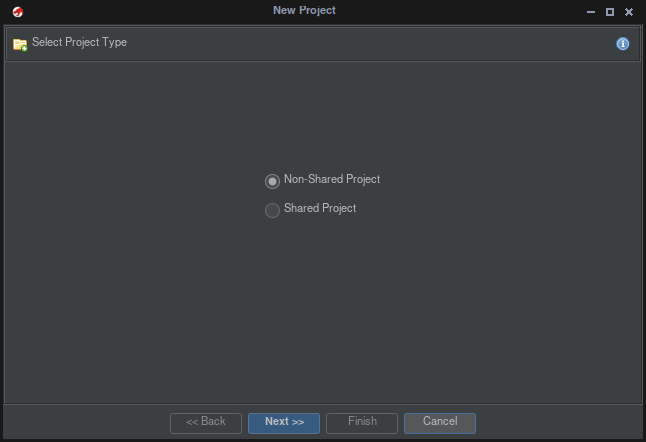
- Non-Shared Project --&gt; Next

[![image.png](https://wiki.mira-ceti.ovh/uploads/images/gallery/2024-04/scaled-1680-/OUWNZMBFIDbozxmz-image.png)](https://wiki.mira-ceti.ovh/uploads/images/gallery/2024-04/OUWNZMBFIDbozxmz-image.png)

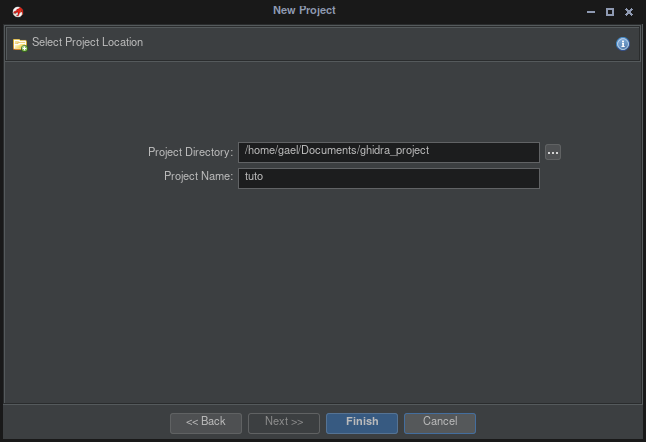
- Give a name to your project --&gt; Next

[![image.png](https://wiki.mira-ceti.ovh/uploads/images/gallery/2024-04/scaled-1680-/LlmdpAQReR254quV-image.png)](https://wiki.mira-ceti.ovh/uploads/images/gallery/2024-04/LlmdpAQReR254quV-image.png)

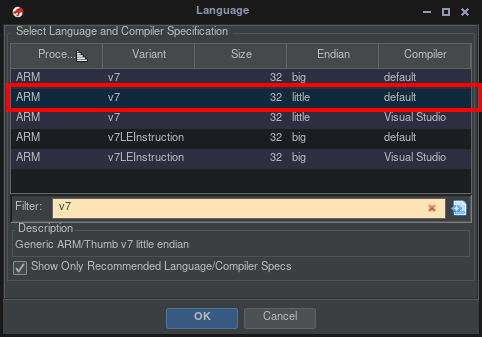
- File --&gt; import File
- Import File lk.bin you want patch

[![image.png](https://wiki.mira-ceti.ovh/uploads/images/gallery/2024-04/scaled-1680-/1r1RwrWd1osSt6Or-image.png)](https://wiki.mira-ceti.ovh/uploads/images/gallery/2024-04/1r1RwrWd1osSt6Or-image.png)
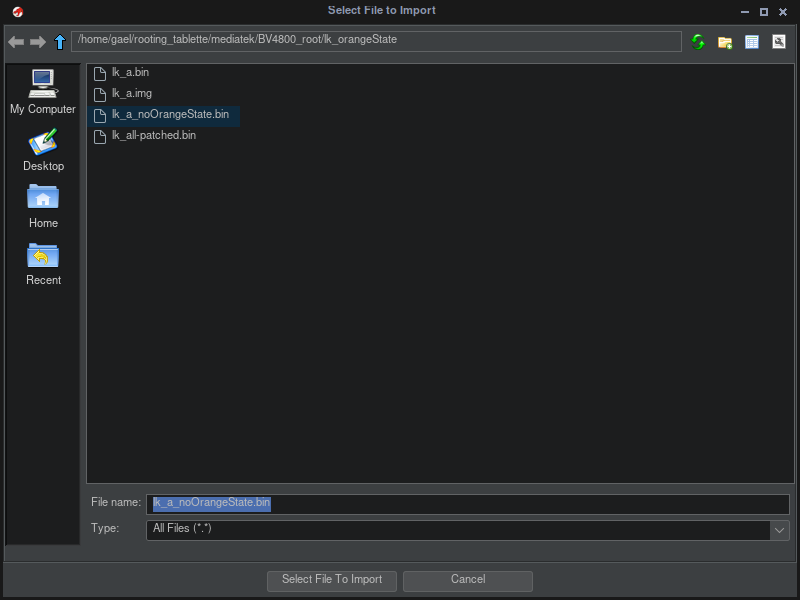
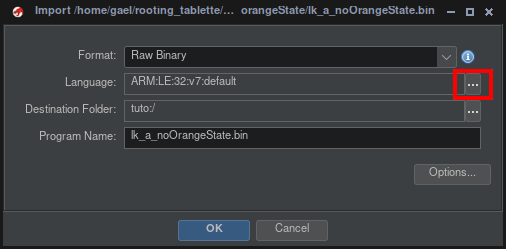
- Select Langage --&gt; ARM v7 | 32 | little | default

[![image.png](https://wiki.mira-ceti.ovh/uploads/images/gallery/2024-04/scaled-1680-/u66IH5m0lfX9Lp8J-image.png)](https://wiki.mira-ceti.ovh/uploads/images/gallery/2024-04/u66IH5m0lfX9Lp8J-image.png)

[![image.png](https://wiki.mira-ceti.ovh/uploads/images/gallery/2024-04/scaled-1680-/IiSdzUsjSePWuIY6-image.png)](https://wiki.mira-ceti.ovh/uploads/images/gallery/2024-04/IiSdzUsjSePWuIY6-image.png)
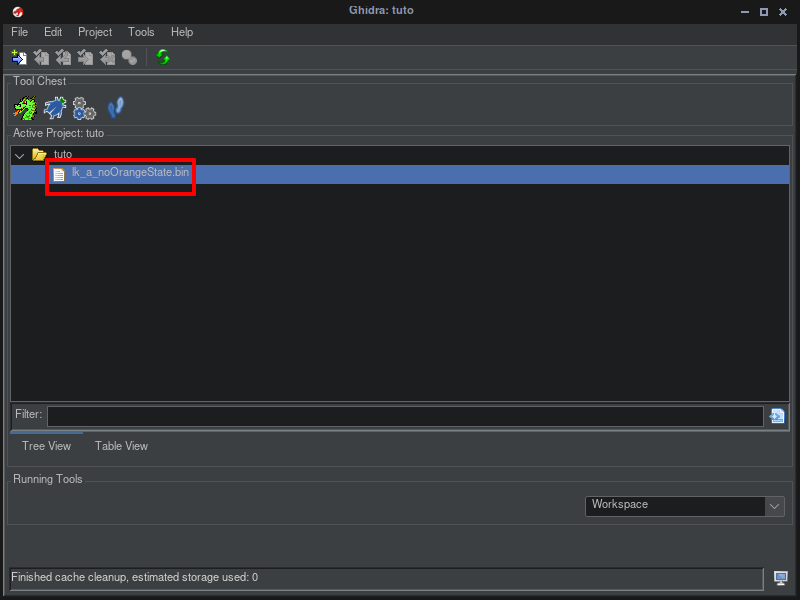
- Double click on file

[![image.png](https://wiki.mira-ceti.ovh/uploads/images/gallery/2024-04/scaled-1680-/WxiTWehYFilimOFE-image.png)](https://wiki.mira-ceti.ovh/uploads/images/gallery/2024-04/WxiTWehYFilimOFE-image.png)
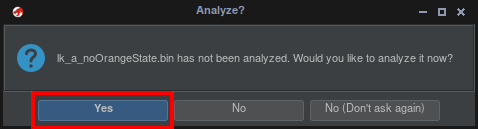
- respond yes to analyzed

[![image.png](https://wiki.mira-ceti.ovh/uploads/images/gallery/2024-04/scaled-1680-/9IMNxZoha1ayKytD-image.png)](https://wiki.mira-ceti.ovh/uploads/images/gallery/2024-04/9IMNxZoha1ayKytD-image.png)
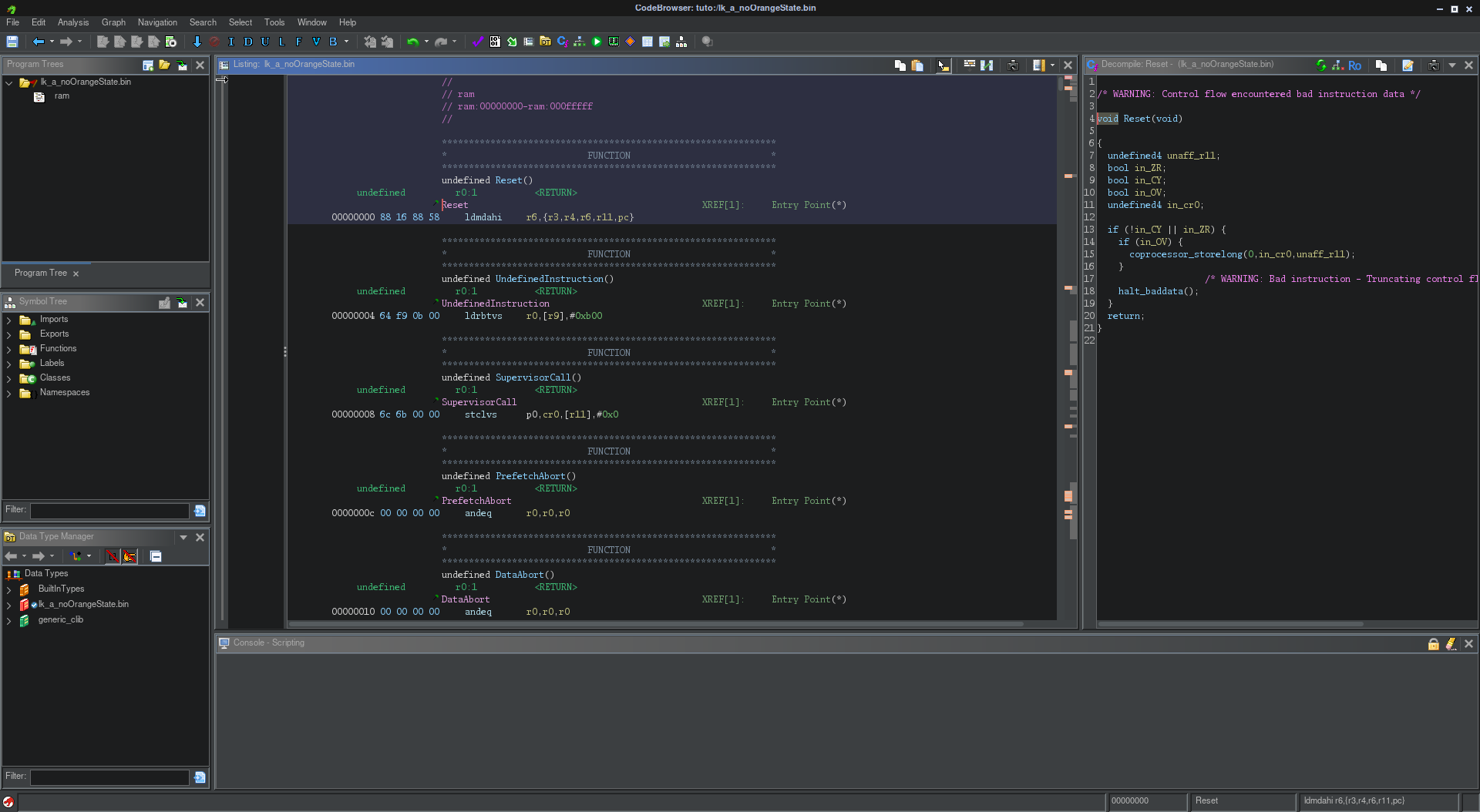
- We will get

[![image.png](https://wiki.mira-ceti.ovh/uploads/images/gallery/2024-04/scaled-1680-/gLUlnYWq6AaV4wWX-image.png)](https://wiki.mira-ceti.ovh/uploads/images/gallery/2024-04/gLUlnYWq6AaV4wWX-image.png)
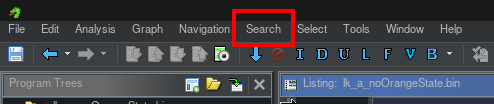
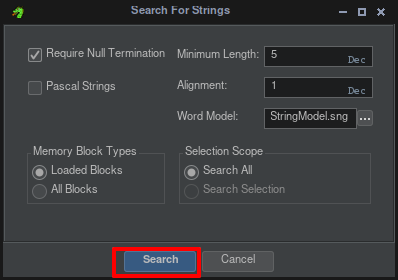
- Search --&gt; for String

[![image.png](https://wiki.mira-ceti.ovh/uploads/images/gallery/2024-04/scaled-1680-/EkVd1sOzqG6656Nl-image.png)](https://wiki.mira-ceti.ovh/uploads/images/gallery/2024-04/EkVd1sOzqG6656Nl-image.png)

- continue with clicking on Search

[![image.png](https://wiki.mira-ceti.ovh/uploads/images/gallery/2024-04/scaled-1680-/hjMH0sWekT9vMqhi-image.png)](https://wiki.mira-ceti.ovh/uploads/images/gallery/2024-04/hjMH0sWekT9vMqhi-image.png)
- ##### type "dm-verity corruption" on filter

[![image.png](https://wiki.mira-ceti.ovh/uploads/images/gallery/2024-04/scaled-1680-/U9l7jjGdvsWEAHXC-image.png)](https://wiki.mira-ceti.ovh/uploads/images/gallery/2024-04/U9l7jjGdvsWEAHXC-image.png)
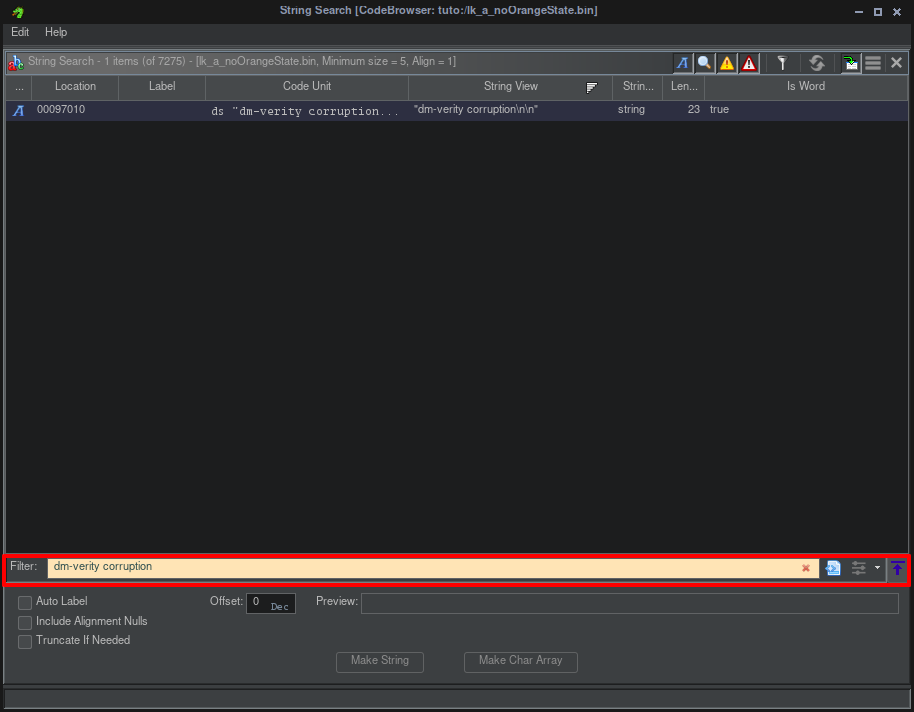
- ##### One final will find --&gt; click on line find

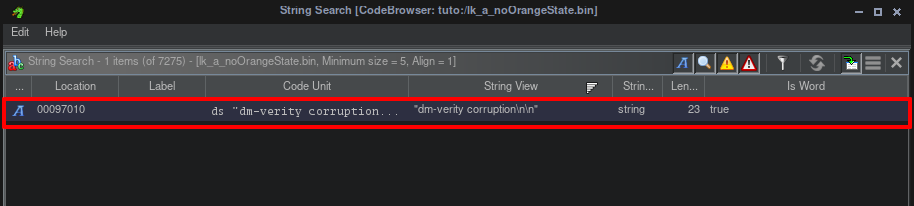
[![image.png](https://wiki.mira-ceti.ovh/uploads/images/gallery/2024-04/scaled-1680-/XLVpM9PW4LrGKLPs-image.png)](https://wiki.mira-ceti.ovh/uploads/images/gallery/2024-04/XLVpM9PW4LrGKLPs-image.png)

- ##### this will give

[![image.png](https://wiki.mira-ceti.ovh/uploads/images/gallery/2024-04/scaled-1680-/feirpxAnhYSlmxai-image.png)](https://wiki.mira-ceti.ovh/uploads/images/gallery/2024-04/feirpxAnhYSlmxai-image.png)
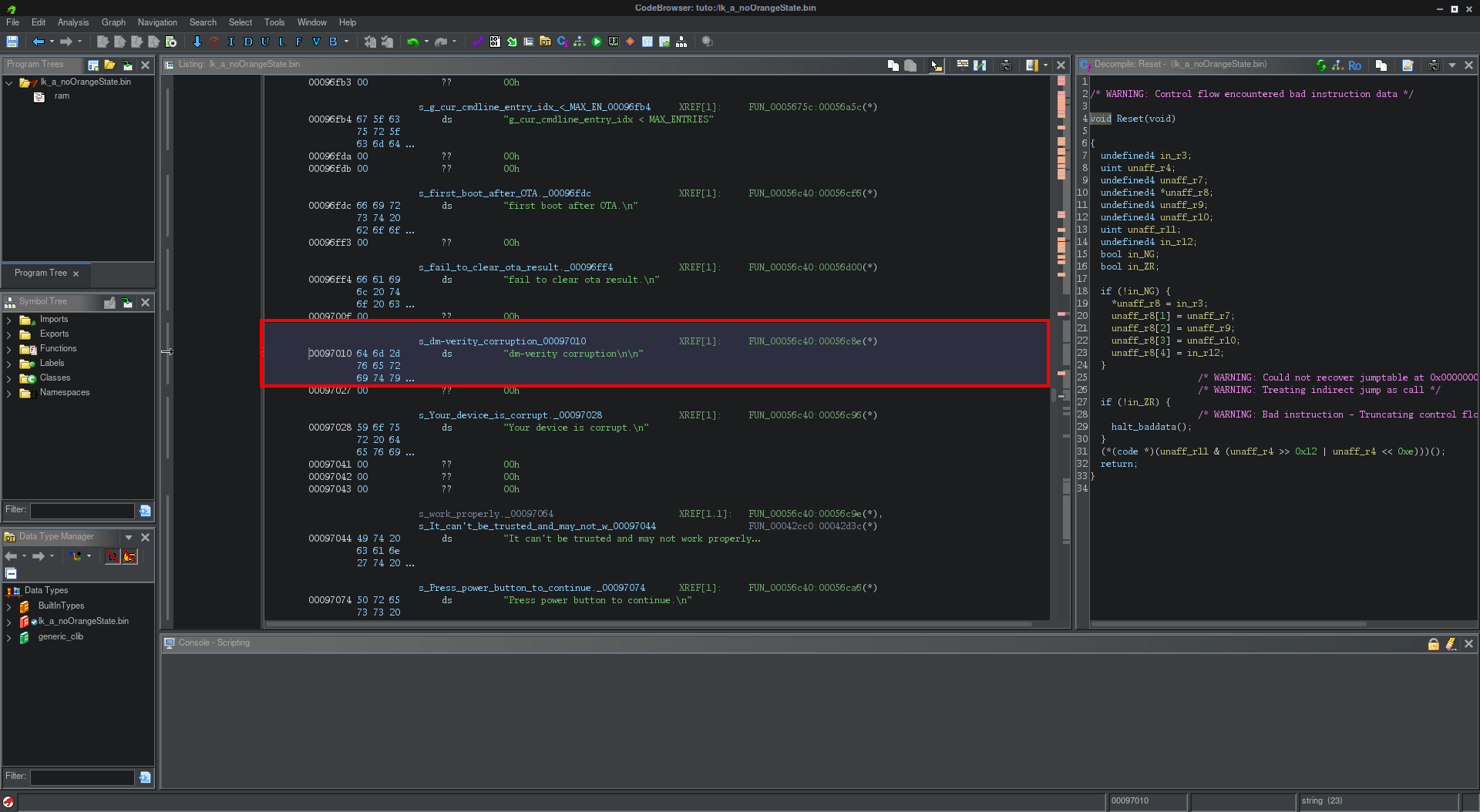
- ##### Go to the fonction who call the string "dm-verity corruption" with double click on hexa (FUN\_00056c40:00056c8e)

[![image.png](https://wiki.mira-ceti.ovh/uploads/images/gallery/2024-04/scaled-1680-/zkMVTbPBIANuSynd-image.png)](https://wiki.mira-ceti.ovh/uploads/images/gallery/2024-04/zkMVTbPBIANuSynd-image.png)

- ##### This will give

[![image.png](https://wiki.mira-ceti.ovh/uploads/images/gallery/2024-04/scaled-1680-/t80el8NmnDisWeSN-image.png)](https://wiki.mira-ceti.ovh/uploads/images/gallery/2024-04/t80el8NmnDisWeSN-image.png)
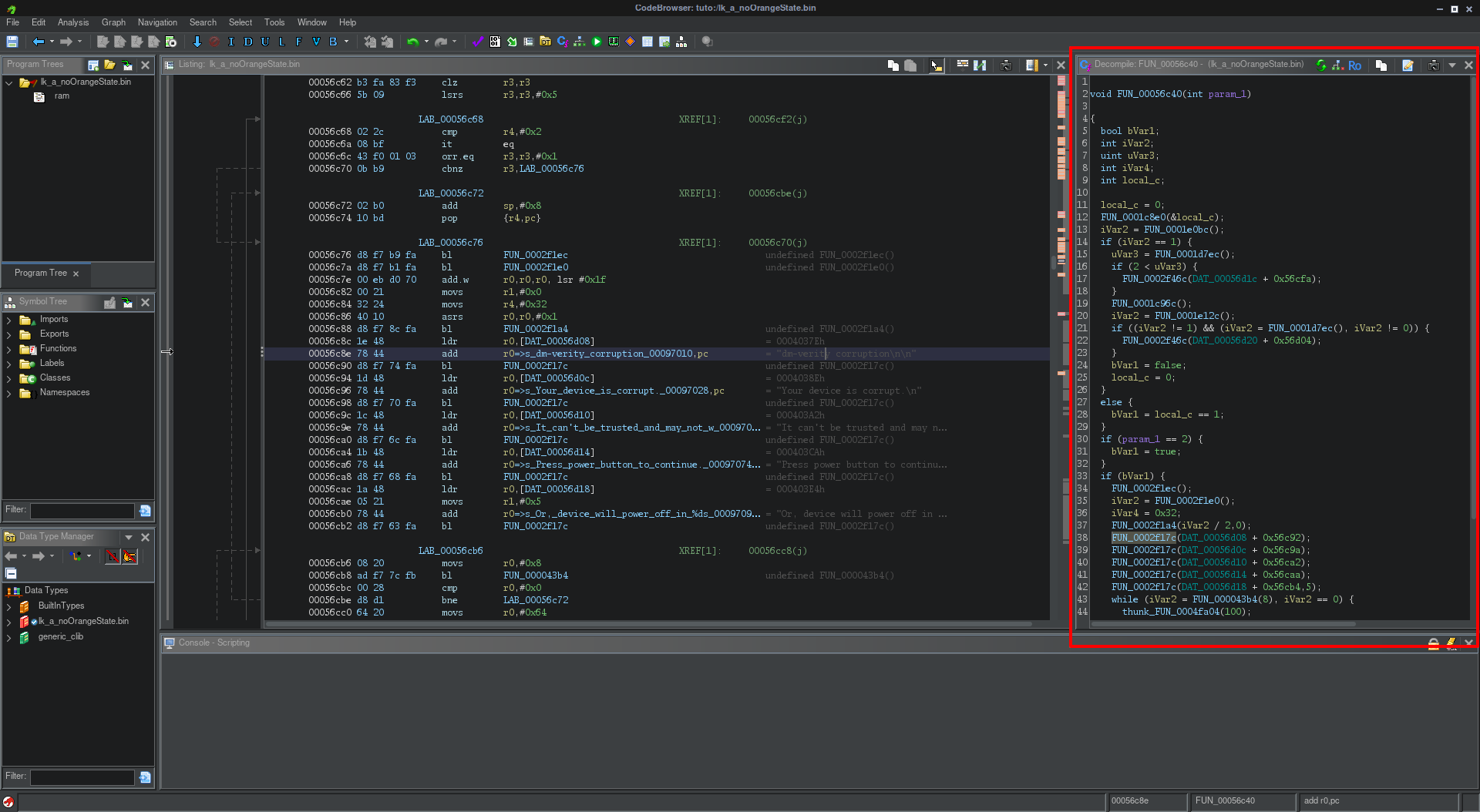
- ##### We get the fonction we need on right

[![image.png](https://wiki.mira-ceti.ovh/uploads/images/gallery/2024-04/scaled-1680-/JVSfPsWGzd8dXH3Y-image.png)](https://wiki.mira-ceti.ovh/uploads/images/gallery/2024-04/JVSfPsWGzd8dXH3Y-image.png)
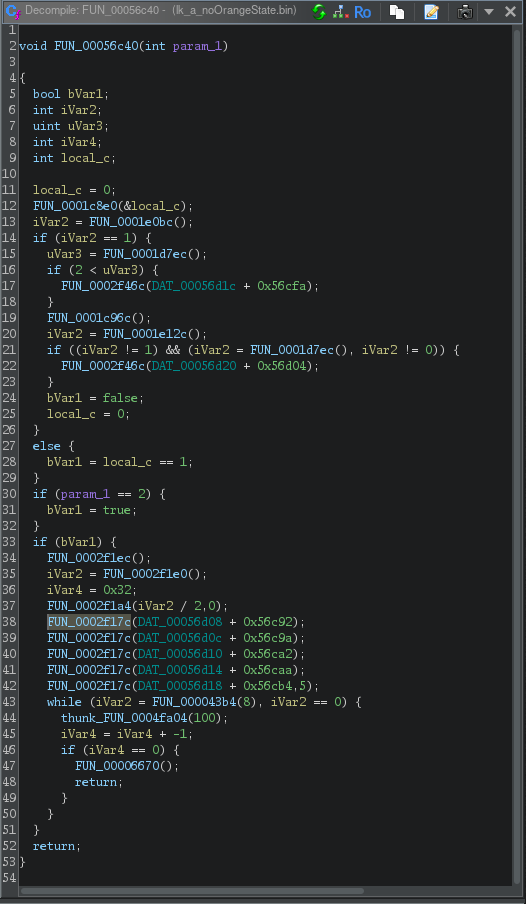
- ##### The fonction who call string dm-verity is highlighted

[![image.png](https://wiki.mira-ceti.ovh/uploads/images/gallery/2024-04/scaled-1680-/zvTGlw5g1ht5g9MW-image.png)](https://wiki.mira-ceti.ovh/uploads/images/gallery/2024-04/zvTGlw5g1ht5g9MW-image.png)

- ##### We can understand if the boot not start correctly

the var [![image.png](https://wiki.mira-ceti.ovh/uploads/images/gallery/2024-04/scaled-1680-/NXwxd89jwewLVRhD-image.png)](https://wiki.mira-ceti.ovh/uploads/images/gallery/2024-04/NXwxd89jwewLVRhD-image.png) and give [![image.png](https://wiki.mira-ceti.ovh/uploads/images/gallery/2024-04/scaled-1680-/e0cGgn3ZKqa91Adf-image.png) ](https://wiki.mira-ceti.ovh/uploads/images/gallery/2024-04/e0cGgn3ZKqa91Adf-image.png)

so the first an green is if boot is corectly and an red if we got an error

[![image.png](https://wiki.mira-ceti.ovh/uploads/images/gallery/2024-04/scaled-1680-/2V7vNSfYCloj57py-image.png)](https://wiki.mira-ceti.ovh/uploads/images/gallery/2024-04/2V7vNSfYCloj57py-image.png)
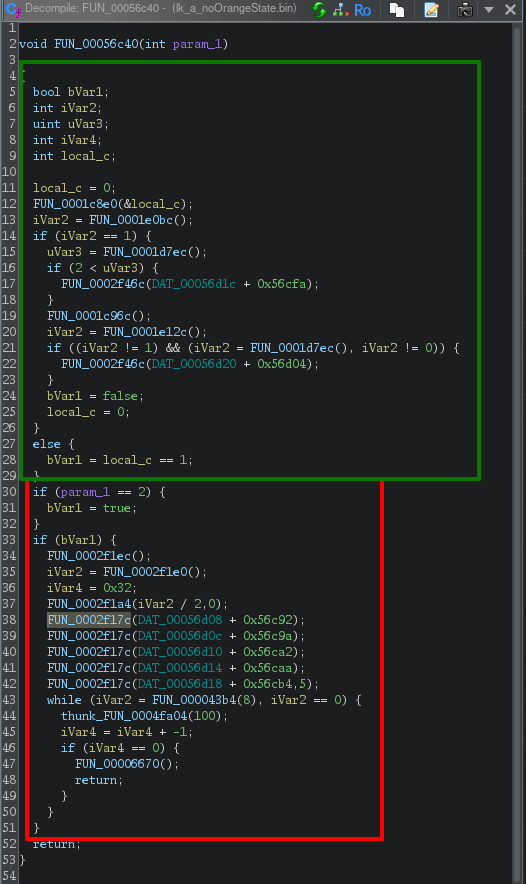
- ##### We therefore need to modify one of these variables so that it is no longer used in the function.

[![image.png](https://wiki.mira-ceti.ovh/uploads/images/gallery/2024-04/scaled-1680-/NXwxd89jwewLVRhD-image.png)](https://wiki.mira-ceti.ovh/uploads/images/gallery/2024-04/NXwxd89jwewLVRhD-image.png) or [![image.png](https://wiki.mira-ceti.ovh/uploads/images/gallery/2024-04/scaled-1680-/e0cGgn3ZKqa91Adf-image.png) ](https://wiki.mira-ceti.ovh/uploads/images/gallery/2024-04/e0cGgn3ZKqa91Adf-image.png)

- ##### In the function, if we click on the desired variable, we move to the line where it is in the file.

[![image.png](https://wiki.mira-ceti.ovh/uploads/images/gallery/2024-04/scaled-1680-/h9ylOZNXwlV5tj0k-image.png)](https://wiki.mira-ceti.ovh/uploads/images/gallery/2024-04/h9ylOZNXwlV5tj0k-image.png)
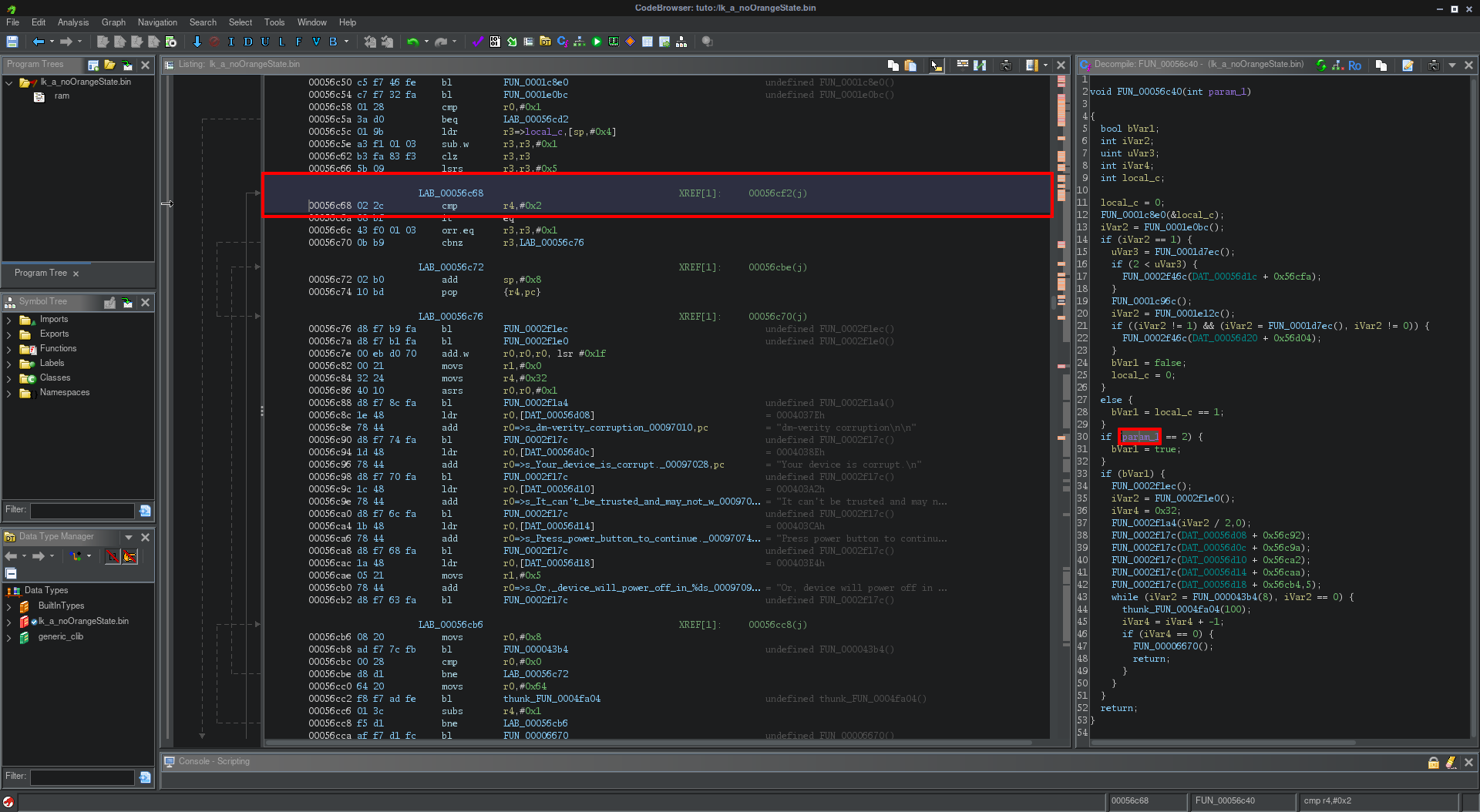
- ##### Right Click on line --&gt; Patch instruction
- ##### Change value of condition

[![image.png](https://wiki.mira-ceti.ovh/uploads/images/gallery/2024-04/scaled-1680-/13Vk9ntqox0HdfpX-image.png)](https://wiki.mira-ceti.ovh/uploads/images/gallery/2024-04/13Vk9ntqox0HdfpX-image.png)

- ##### We can do like this

[![image.png](https://wiki.mira-ceti.ovh/uploads/images/gallery/2024-04/scaled-1680-/5X7sScecDlKV84YO-image.png)](https://wiki.mira-ceti.ovh/uploads/images/gallery/2024-04/5X7sScecDlKV84YO-image.png)

[![image.png](https://wiki.mira-ceti.ovh/uploads/images/gallery/2024-04/scaled-1680-/C8nwav5rZgAFK2T8-image.png)](https://wiki.mira-ceti.ovh/uploads/images/gallery/2024-04/C8nwav5rZgAFK2T8-image.png)
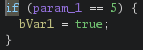
- ##### After this we can save file quit
- ##### For export with menu project
- ##### Right click on file --&gt; select export
- ##### You can choose Format Original File

### Find the warning string

[https://github.com/R0rt1z2/lkpatcher](https://github.com/R0rt1z2/lkpatcher)

[https://lkpatcher.r0rt1z2.com/](https://lkpatcher.r0rt1z2.com/)

[https://blog.r0rt1z2.com/patch-mediatek-bootloader-images-lk.html](https://blog.r0rt1z2.com/patch-mediatek-bootloader-images-lk.html)